


why your office chair matters more than your monitor
Here is the uncomfortable truth about home office setups: most people spend more researching their monitor, keyboard, or desk than the chair they sit in for 8+ hours daily. Yet your chair has a more direct impact on your health than any other piece of office equipment. Poor lumbar support leads to chronic lower back pain, inadequate seat depth causes circulation issues in your legs, and non-adjustable armrests contribute to shoulder and wrist strain. A bad chair does not just make you uncomfortable — it creates compounding musculoskeletal problems that worsen over years of daily use.
The good news: you do not need to spend $1,000+ on a Herman Miller or Steelcase to get a chair that genuinely protects your back. The sub-$300 ergonomic chair market has improved dramatically, with several manufacturers now offering features that were exclusive to premium chairs just five years ago — dynamic lumbar support, multi-dimensional armrests, seat depth adjustment, and tensioned mesh backs. The challenge is knowing which features actually matter for your body type and sitting habits, and which are marketing fluff. That is what this guide is for.
the five ergonomic features that actually matter
1. Lumbar support with real adjustability. This is the single most important feature in an ergonomic chair. Your lower back has a natural inward curve (lordosis), and a good chair maintains that curve throughout the day. Fixed lumbar pads are better than nothing, but adjustable lumbar that moves in height (to match where YOUR curve is) and depth (to control how aggressively it pushes forward) is what separates chairs that prevent back pain from chairs that merely look ergonomic. The Sihoo Doro C300 goes further with dynamic lumbar that tracks your movements automatically — you do not adjust it, it adjusts to you.
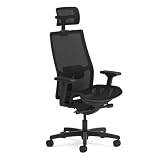
2. Seat depth adjustment. This is the most overlooked feature. If the seat pan is too deep for your thigh length, the front edge presses into the back of your knees and restricts blood flow — leading to numbness, tingling, and circulatory issues over time. A seat depth slider lets you match the pan length to your thighs, ensuring 2-3 fingers of space between the seat edge and the back of your knees. The Sihoo Doro C300 and the HON Ignition 2.0 both include this adjustment. If you are shorter than 5\'6" or taller than 6\'1", seat depth adjustment is not optional — it is essential.
3. Multi-dimensional armrests. Height-only armrests are the bare minimum. Width adjustment lets you bring armrests closer together or further apart to match your shoulder width. Angle adjustment lets you angle them inward for typing or outward for mouse use. Depth adjustment (forward/backward) positions the armrest pad under your forearm regardless of how close you sit to the desk. The more dimensions of adjustment, the better the armrest can support your specific arm position and reduce shoulder strain. The Nouhaus Ergo3D leads here with 4D armrests; the Sihoo Doro C300 offers solid 3D adjustment. If you have desk space, our standing desk vs walking pad comparison covers the other half of the ergonomic equation.
4. Synchronized tilt mechanism. Basic chairs tilt the entire seat backward when you recline. Synchronized tilt moves the seat and back at different angles — typically the back reclines 2-3 degrees for every 1 degree the seat tilts. This maintains your pelvis in a neutral position throughout the full range of recline, preventing the slouching that happens when your seat tilts too far back and your hips slide forward. The HON Ignition 2.0 uses advanced synchro-tilt; most chairs on this list include at least basic synchro-tilt.
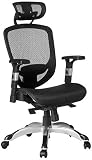
5. Material that matches your climate. Mesh backs and seats breathe and dissipate heat. Foam seats provide more cushioning but trap body heat. Leatherette looks premium but gets warm in hot rooms. If you work in an air-conditioned office, material matters less. If you work from a home office without strong AC, or you naturally run warm, full mesh (like the Staples Hyken) will keep you noticeably more comfortable over an 8-hour day than foam or leather alternatives.
how to set up any ergonomic chair correctly
Even the best ergonomic chair is only effective if you set it up for your body. Start with seat height: your feet should be flat on the floor with your thighs parallel to the ground and knees at a 90-degree angle. If the chair cannot go low enough, you need a footrest. Next, adjust the seat depth so 2-3 fingers fit between the seat edge and the back of your knees. Then set the lumbar support height so the most prominent part of the pad aligns with the curve of your lower back (typically 2-4 inches above the seat pan). Set armrest height so your forearms are parallel to the floor when typing, with shoulders relaxed and not shrugged upward.
What is the most important adjustment on an ergonomic office chair?
Lumbar support height is the single most critical adjustment—it must align with your natural lower back curve to prevent chronic back pain. After lumbar height, seat depth is second most important because incorrect depth restricts circulation in your thighs and creates numbness over time. Most people overlook seat depth adjustment entirely, which is why it's the most underrated feature in office chairs. If a chair doesn't have seat depth adjustment, you're compromising on a fundamental ergonomic control. For more on this, see our competitively priced home office accessories guide for competitively priced setup solutions.
Finally, adjust the tilt tension so you can lean back against the backrest with gentle pressure without the chair throwing you backward. You should be able to rest against the backrest while working without actively engaging your core to stay upright — if you are fighting the chair to maintain position, the tilt tension is wrong. These adjustments take 5 minutes and are the difference between an ergonomic chair that works and one that is just expensive furniture.
budget tiers and what you actually get
Under $120 (Hbada flip-up): Basic lumbar, height adjustment, tilt, breathable mesh. You get a chair that is dramatically better than a non-ergonomic chair. The Hbada at this price covers the essentials — your back is supported, your posture is improved, and the chair breathes. What you sacrifice: limited armrest adjustability, no seat depth adjustment, basic lumbar that works but does not fine-tune.
How often should you replace your ergonomic office chair?
Budget chairs under $150 typically last 2-3 years with daily 8-hour use before gas cylinders fail and mesh tension degrades. Chairs in the $250-300 range from manufacturers with commercial lines and multi-year warranties — HON publishes a limited lifetime warranty on its commercial seating — last 5-7 years. The cost-per-year calculation almost always favors spending more upfront—a $300 chair over 6 years costs only $50/year while a $120 chair lasting 2 years costs $60/year. Warranty length is the best indicator of expected lifespan; if the manufacturer only warranties 1 year, expect replacement within 18-24 months. Check out kitchen gadget recommendations for other long-lasting home investments.
$140-$200 (Staples Hyken): Full mesh construction, adjustable lumbar tension, tilt lock, headrest. This tier adds breathability (mesh seat, not just mesh back), more sophisticated lumbar control, and the ability to lock your recline angle. The Hyken is the value sweet spot — you get 80% of premium chair features at a much more accessible price point. For anyone building a work-from-home desk setup, the Hyken is the default chair recommendation.
$190-$230 (Duramont, GABRYLLY): The quiet middle. You gain the things the budget tier skips — lumbar that adjusts in depth as well as height, rollerblade casters that do not chew up hardwood, seats sized for larger frames — without paying for dynamic mechanisms. If the budget picks have failed you on fit or floor type rather than on features, this is the tier that fixes it.
$230-$300 (Sihoo, HON, FlexiSpot, Nouhaus): This tier delivers the features that truly separate ergonomic chairs from office chairs: seat depth adjustment, 3D+ armrests, dynamic or adjustable lumbar with height and depth control, synchronized tilt mechanisms, and substantially better build quality with longer warranties. The jump from $150 to $280 is not 2x the chair — it is qualitatively different adjustability that lets you custom-fit the chair to your body rather than adapting your body to the chair.
warranty and longevity — the hidden cost of cheap chairs
A $100 chair that lasts 2 years costs the same per year as a $300 chair that lasts 6 years — except the $300 chair provides better support every single day. Warranty length is the best proxy for how long the manufacturer expects the chair to survive daily use. HON offers a limited lifetime warranty on their commercial lines. Most consumer ergonomic brands in the $230-$300 band publish two to five years. Competitively priced chairs under $150 typically offer 1-year warranties, which tells you exactly how long they are designed to last. If you are buying a chair for a permanent home office, the cost-per-year calculation almost always favors spending more upfront for a chair with a 3-7 year warranty over replacing a cheap chair every 18-24 months.
Bottom line: The Sihoo Doro C300 wins for most people — its self-adaptive lumbar system, seat-depth slider and 3D armrests put it in a class above similarly priced competitors, and it is the pick if you sit for long stretches. If budget is tight, the Staples Hyken delivers exceptional value with full mesh breathability. If the problem is fit rather than features — a shared desk, or a body outside the average — the Nouhaus Ergo3D has the widest adjustment range on this list.
