

The complete sub-$50 home office buyer's guide
Most $50 desk upgrades are aesthetic, not functional. The four picks above are the rare category where the value is real and durable — input devices that prevent wrist injury, lighting that prevents eye strain, surface protection that lasts five years, and cable management that you stop noticing within a week. Here's the deeper context for each decision.
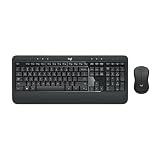
Why is the Logitech MK540 the default WFH keyboard combo?
Logitech has been refining the Unifying receiver protocol since 2009 — the wireless link is genuinely more reliable than Bluetooth for the specific case of a desktop keyboard and mouse used during video calls. The MK540 also includes the integrated palm rest that more expensive Logitech models (MX series) skip in favor of a slimmer profile. For under $45, you get the wrist-position benefit, the long battery life (3 years on the keyboard, 18 months on the mouse), and the single-receiver convenience of one USB port for both devices. The keys aren't mechanical, but they're tactile enough that touch typists don't lose accuracy and quiet enough for shared apartments.
Is a monitor light bar actually worth it vs. a regular desk lamp?
Yes — and the difference becomes obvious within two weeks of side-by-side use. A traditional desk lamp creates two problems: it occupies desk surface area you don't have, and it inevitably reflects off your monitor at some angle, creating contrast glare that your eyes have to constantly compensate for. Monitor light bars use asymmetric optics (the same design principle BenQ patented for the ScreenBar) that direct light forward and down — onto your keyboard and notes — with effectively zero light bouncing back at the screen. The Quntis is the rare sub-$50 option that includes the auto-dimming ambient sensor, which most cheaper alternatives skip.
What makes a desk mat worth $30 vs. a $10 alternative?
Three things: edge construction, surface material, and size. The Gallaway uses heat-stitched, double-sealed edges that don't peel within six months the way budget mats with glued edges do. The PU leather surface is genuinely waterproof and wipeable (cheaper PVC mats are not — coffee stains them and the surface gets sticky over time). And at 36 inches wide, it actually covers most of a standard desk, where 31-inch budget mats leave awkward bare-desk strips at the edges. The math on the lifetime cost is straightforward: one quality mat for five years vs. five cheap mats for the same period.
Why a no-drill cable tray vs. one that screws into the desk?
For most WFH situations, the no-drill clamp design is strictly better — it works on rentals where you can't modify the desk, on quality desks you don't want to put screws into, and on future-proof setups where you might upgrade your desk later. The clamp-mount version installs in three minutes without tools and detaches without leaving a trace. The 3M adhesive alternative looks cleaner but typically fails within a year as the plasticizer in cable jackets degrades the bond and the loaded tray drops onto your floor at 2am.
What if my biggest WFH problem is back/neck pain, not eye strain or wrist?
Then your priorities should shift to a chair upgrade and a laptop stand to bring your screen to eye level — both are above the $50 budget covered here, but they're the right next-tier purchases. Working with your laptop on a flat desk forces a 30-40 degree neck flex that compounds into chronic strain over months. Once you have an external keyboard (like the MK540 above), elevating your laptop screen on a stand is the single most-recommended ergonomic intervention by physical therapists who treat remote workers.
Should I buy all four picks at once or sequence them?
Sequence based on your current pain point. If you're still on a laptop trackpad, the keyboard combo is the first buy — wrist injury compounds silently and is the hardest to reverse. If you have headaches or eye fatigue at end-of-day, the monitor lamp goes first. If your desk is on camera and looks chaotic, the leather mat is the highest-visual-impact change. The cable tray is the "invisible until it's not" pick — buy it last unless you've actively tripped on a cable. All four together is roughly $130 and addresses the four most common WFH frustrations.
Are there any sub-$50 categories we deliberately skipped?
Yes — desk lamps (the monitor light bar replaces this category entirely for screen work), desk organizers (most are aesthetic and become clutter themselves within months), USB hubs (better to buy a high-quality one above $50 than three cheap ones that fail), and webcams under $50 (the modern laptop integrated webcams have caught up to budget USB cameras; spend on a good one or skip). The four picks above are deliberately the sub-$50 categories where the budget tier delivers real, durable value rather than disposable novelty.